

In today’s digital world, online advertisements are everywhere—on social media feeds, search results, and websites. While most are from legitimate businesses, a growing number are designed by cybercriminals to steal your money, personal information, or even infect your device. These are the nefarious scam ads, and being able to identify them is a crucial skill for safe browsing.
Here’s a breakdown of why you need to be careful, what to look out for, and how to protect yourself.
Why the Danger is Real: The Threats Behind the Click
Clicking on a fraudulent ad isn’t just a minor annoyance; it can lead to serious consequences. Scammers are highly motivated because ad fraud is one of the most lucrative forms of cybercrime. The goal is never to deliver what’s promised, but to exploit your trust.
The primary dangers include:
- Financial Loss: Scams often trick you into paying for non-existent or counterfeit products, or worse, giving up your credit card details to be used for unauthorized purchases.
- Identity Theft: Phishing ads direct you to fake login pages (e.g., for banks or social media) designed to steal your usernames, passwords, and other sensitive personal data.
- Malware and Viruses: Some malicious ads, known as “malvertising,” can instantly download malware onto your device the moment you click, jeopardizing your security and privacy.
- Job and Investment Scams: These ads promise high returns or lucrative, easy work-from-home jobs, only to lure you into illegal money laundering schemes or trick you into investing in bogus cryptocurrency and financial opportunities.
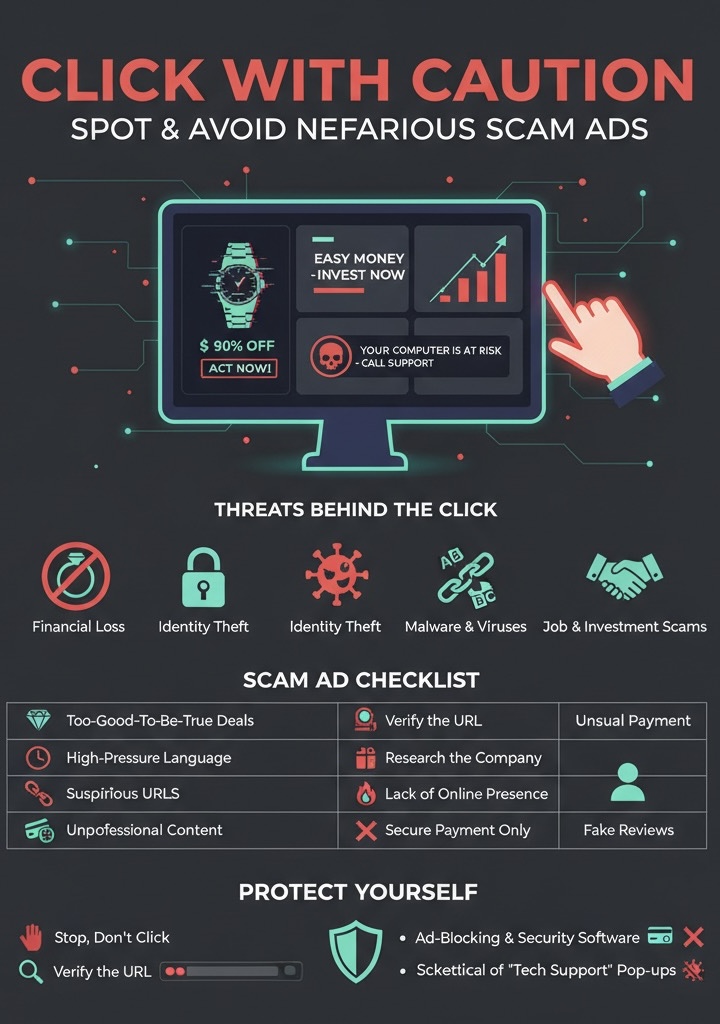
Spotting the Red Flags: A Scam Ad Checklist
Fraudulent ads are designed to look legitimate, often mimicking trusted brands. However, they almost always contain subtle (or not-so-subtle) signs that can give them away.
Red Flag
Why It’s Suspicious
Too-Good-To-Be-True Deals
Luxury items (like high-end electronics or designer goods) advertised at massive, unbelievable discounts (e.g., 90% off). | Legitimate companies rarely offer discounts this deep on new or popular products. Scammers use this lure to create urgency.
High-Pressure or Panic Language: Phrases that insist on immediate action, like “Act Now!,” “Limited-Time Offer!,” or pop-ups that claim “Your computer is at risk!” and demand you call a “support” number. Scammers use urgency to make you rush a decision without thinking or verifying the source.
Suspicious URLs/Links — The link or web address looks slightly off, with odd spellings, extra characters, or a brand name mixed with numbers (e.g., Amaz0n-deals.com). Scammers use “typosquatting” to mimic real company websites. Always check the full URL before clicking.
Unprofessional Content – Poor grammar, obvious spelling mistakes, or low-resolution images and blurry brand logos. (Note: AI is making this harder to spot, so don’t rely on this alone). Professional companies invest in high-quality advertising; errors indicate a lack of authenticity.
Requests for Unusual Payment – Asking for payment via wire transfers, gift cards, or cryptocurrency for a standard online purchase. Legitimate e-commerce sites use secure, standard payment processors that offer buyer protection.
Lack of Online Presence – Searching for the company advertised reveals no official website, little-to-no history, or very few customer reviews on independent sites. Legitimate businesses have an established digital footprint. A blank history is a major warning sign.
Reviews and Engagement Issues – The ad has comments disabled, or the associated social media page has an unusually high number of generic-sounding five-star reviews but very little genuine-looking engagement. Scammers disable comments to prevent users from warning each other, or they purchase fake followers and reviews.
How to Protect Yourself and Stay Safe
Your best defense against scam ads is a combination of caution, verification, and using the right tools.
Stop, Don’t Click: If an ad sparks your interest, do not click the link in the ad. Instead, open a new browser tab and manually navigate to the official, known website of the brand. Search for the deal there. If it’s a real offer, it will be prominently displayed on the company’s real site.
Verify the URL: Hover your mouse over the link in the ad (without clicking) to see the actual destination URL appear in the bottom corner of your browser. If the address looks suspicious, close the ad immediately.
Research the Company: If you don’t recognize the brand, do a quick Google search for the company name followed by “scam,” “review,” or “complaints.” Check independent review sites like Trustpilot.
Use Ad-Blocking and Security Software: Use a reputable ad blocker to filter out many suspicious ads before you even see them. Ensure your operating system and antivirus/security software are always up-to-date, as they are constantly patched to defend against new malware and phishing threats.
Never Pay with Gift Cards or Crypto: Only use secure, verified payment methods for online purchases. If an unknown entity is demanding payment in gift cards, wire transfers, or cryptocurrency, it is a scam.
Be Skeptical of “Tech Support” Pop-ups: If a pop-up warning suddenly appears claiming your computer is infected and you must call a number, it is a scam. Close the browser window (you may need to use Task Manager or Force Quit if it locks up) and run a scan with your trusted antivirus software.
By staying vigilant and knowing the signs, you can navigate the online landscape safely and keep cybercriminals from turning your clicks into their profit. Stay safe out there!
This is not an official statement of Hexagon Center.